1. Basic Concepts of the Version:
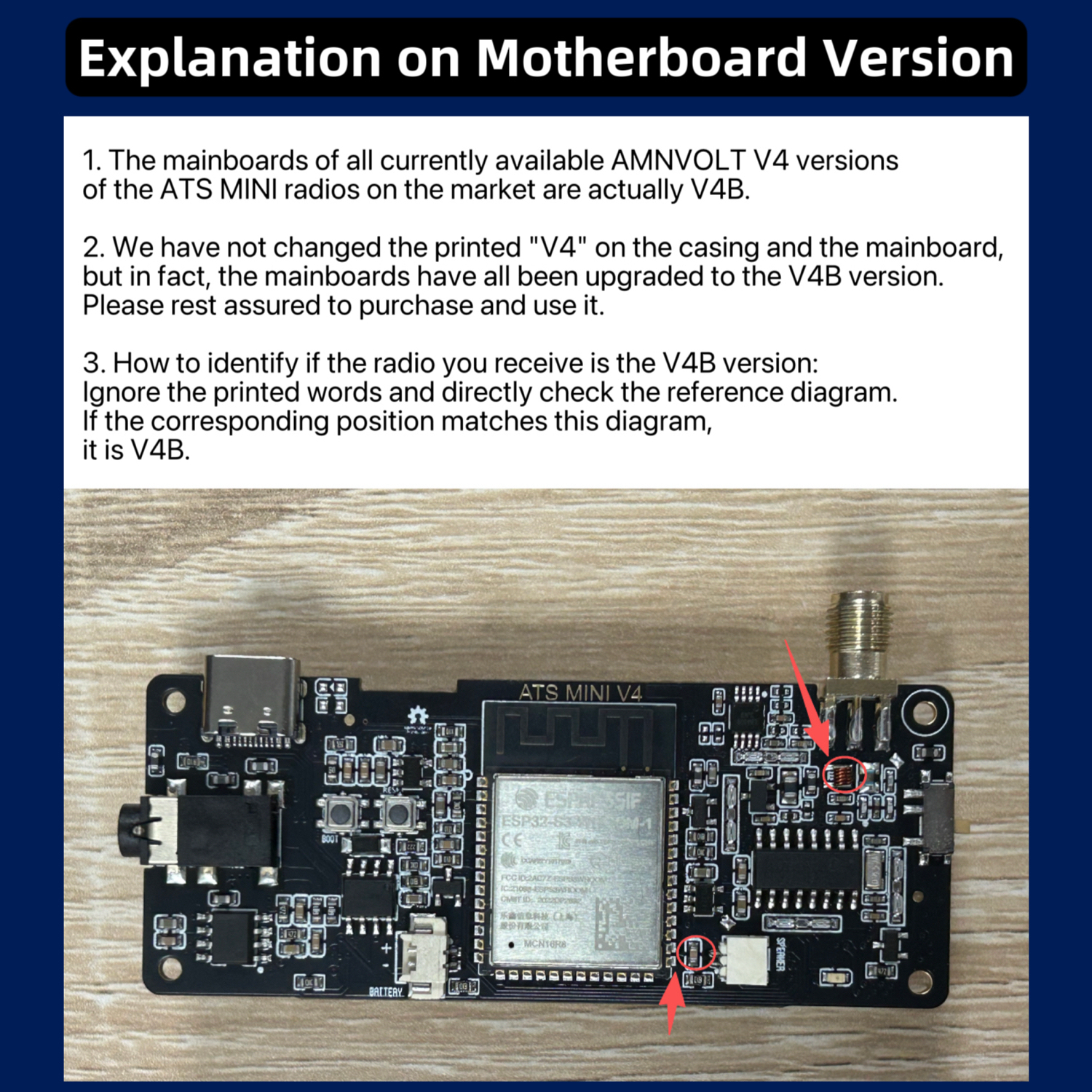
V4 represents the fixed model of this radio receiver; V4B merely refers to the latest production batch number of the motherboard of the V4 series, and it is not an independent model of the entire machine. The silk-screened logo on the motherboard still indicates V4 and will not have the "V4B" label printed. The panel, printed text on the motherboard, outer packaging, and product labels of the entire machine are all uniformly made using the series identifier "V4". It is impossible to determine the motherboard batch by the appearance or component printed text.
2. Unified Description of Available Batch Levels:
Starting from the beginning of 2026, the motherboards of the V4 models have completed the upgrade switch and are all using V4B batch motherboards. Currently, all in-sale AMNVOLT V4 series products: those with the product title marked as V4 or V4B, and the printed text on the body / motherboard / packaging label as V4, all fall within the normal situation. The internal motherboards equipped are all of the V4B new batch design, and there is no mixed distribution of new and old batches.
3. Version Verification Method:
After receiving the product, if you want to confirm the actual batch of the motherboard, you cannot check the printed text of the components. Please refer to the accompanying graphic tutorial to verify the hardware details.
4. Clarification of Common Questions:
Recently, some users have found that the body, motherboard, and packaging only have "V4" printed, mistakenly believing they have received old batch products. This is hereby clarified: The letters on the silk-screened motherboard and the entire appearance of the machine have been printed with the V4 identifier as the established design. The currently purchased in-sale models actually have internal motherboards of the V4B batch. Please rest assured to use them.
1. Regarding V5. Since V4 is already sufficiently complete and excellent, we do not have a plan to produce V5 in the short term. At least, we will gradually start designing or producing it after half a year to one year. If you see anyone selling the so-called V5 on any sales platform, it must be fake. You can also send us an email to confirm.
2. Regarding H.J. Berndt Version Firmware, please open this link to download and view the tutorial. V4 has already received hardware support for this firmware and does not require additional soldering or modification of the motherboard: http://www.hjberndt.de/dvb/pocketSI4735DualCoreDecoder.html
Hi! We are AMNVOLT team, and we promise that we will continue to use the best materials to make this mini radio, and continue to improve its hardware.
Many thanks to @OM0ET and the authors of the firmware [PU2CLR (Ricardo Caratti), Volos Projects, Ralph Xavier, Sunnygold, Goshante, G8PTN (Dave), R9UCL (Max Arnold), Marat Fayzullin] for their selfless and outstanding contributions to this radio!
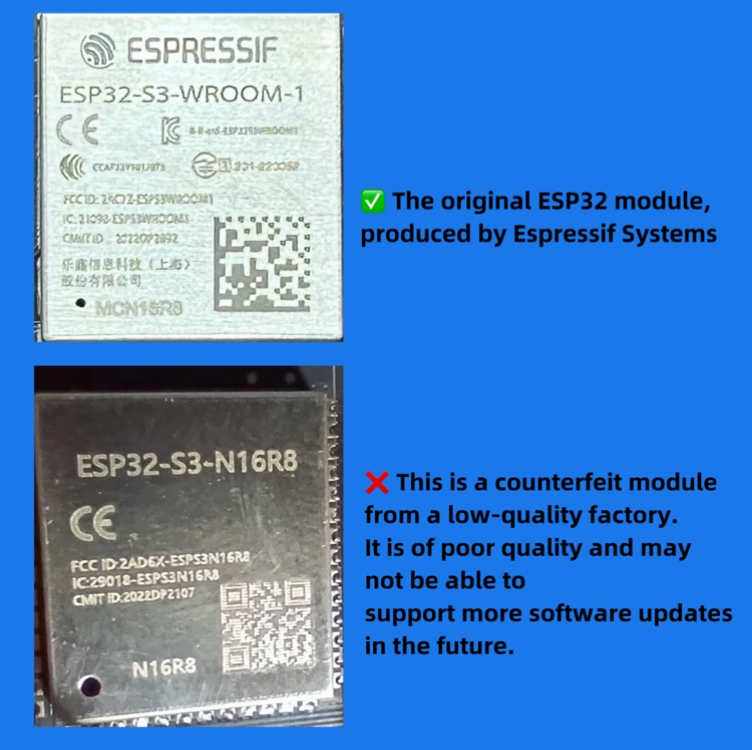
Due to the presence of low-quality products from substandard manufacturers on the market—which may use inferior screens, main control chips, or even poor-quality batteries—users may experience degraded performance, and the hardware may not support the latest firmware updates.
We have listed on this website the stores that sell high-quality products manufactured by us. Feel free to choose and purchase from them:
V4 series (in fact, all the motherboards have been updated to the latest V4B version) :Link 1(The most recommended store by the official): Click here
Link 2: Click here
Link 3(The officially recommended AE store): Click here
Link 4(for US): Click here
Link 5(This link sells a neutral metal casing version, with the words "V4" and "AMNVOLT" not printed on the casing): Click here
Link 6: Click here
Link 7: Click here
V1 :We have stopped the production and sale of V1.
V2 :4. Ongoing update....
V3S :1. AE Choice Store : Click here
2. Banggood(Highly recommend that you purchase from this store) : Click here
3. Authorized store : Click here
4. Recommended store : Click here
5. Exclusive link for US: customers : Click here
How to distinguish radio versions when purchasing :
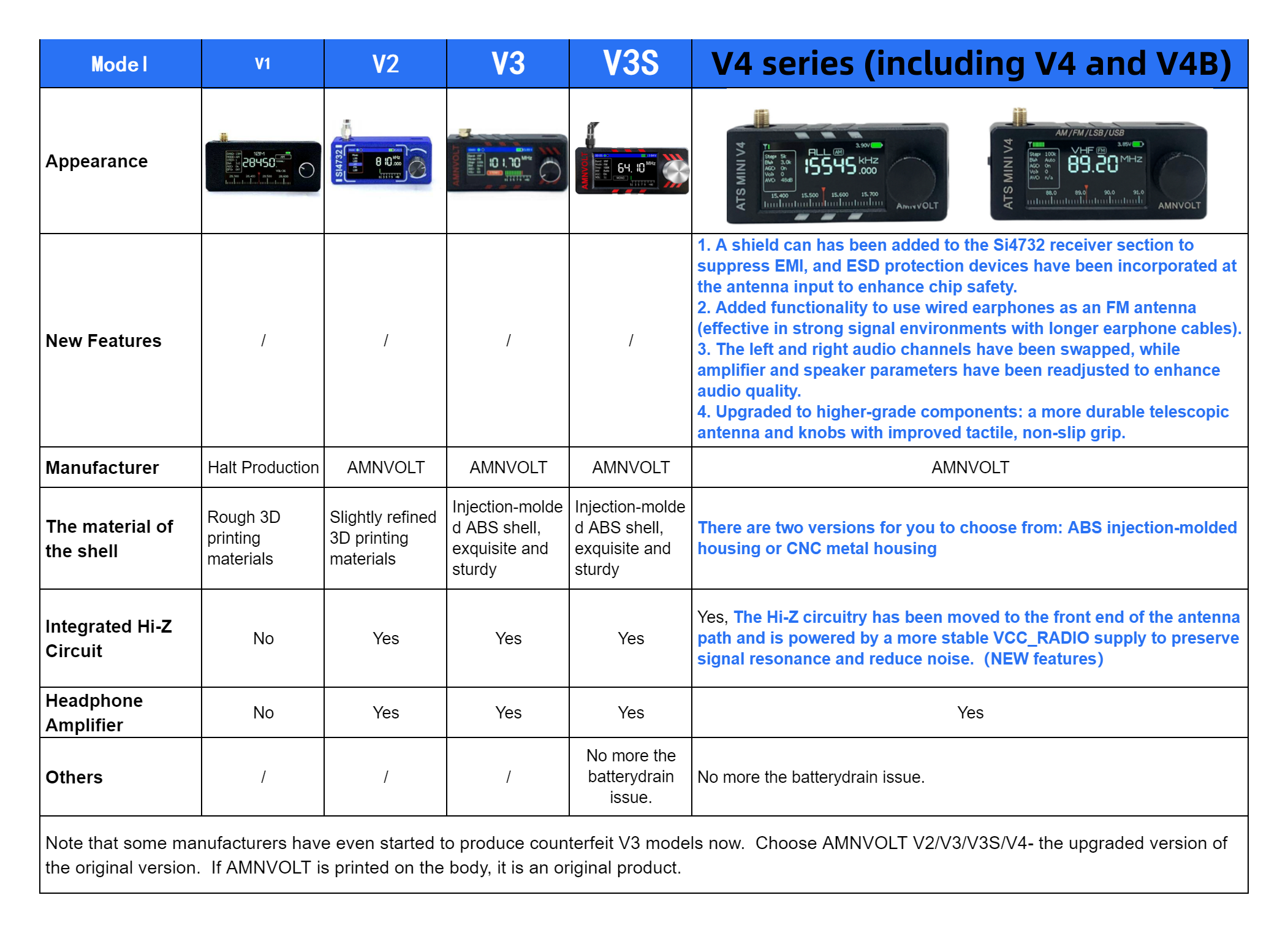
1. Check the exterior design as shown in the images. (Note: Some V2 radios retained the V1 design during production - contact the seller's customer service for confirmation)
2. Verify both front and back panels: Radios printed with our brand "AMNVOLT" are 100% genuine (with built-in headphone amplifier and Hi-Z, And it uses an ABS plastic casing to fix the problem of battery power consumption)
3. Review product listing comments to see images shared by other buyers.
1. Double-click the button on the home screen to enter the menu
2. On the menu page, rotate the knob to switch the menu and mode, etc. Click again to "Confirm".
3. On the home screen, rotate the knob to change the frequency band, and click again to confirm.
4. Because the case is very small,so the volume output is low after the earphone is inserted, which is a normal phenomenon, and the external audio can be connected to reach a larger volume.
1. Please use Windows 10 system to run [Flash Download Tool.zip]
2. Select the [ChipType:ESP32-S3]->[WorkMode:Devoelop]->[LoadModel:USB]
3. Select first bin file "xxxx.ino.bootloader.bin" @ "0x0"
Select second bin file "xxxx.ino.partions.bin" @ "0x8000"
Select third bin file "xxxx.ino.bin" @ "0x10000"
4. Just connect the USB Typec, keep the MINI RADIO power on, and wait for ~10 seconds for the computer to find it.
5. Set "COM: XXXXX",and click [START]
6. After the upgrade is completed, you can enjoy it
Tip:If the burning fails and the system cannot be started, don't worry, the ESP32 system will not be destroyed, you just need to re-burn it.
We have also been actively trying to find contact information for the firmware team, but due to the cross-border situation, we have been consistently unsuccessful. We hope to get in touch with the firmware team and work together to optimize and innovate the ATS MINI at both the software and hardware levels. If anyone has the contact details for the firmware team, please let us know via email.
Please be careful. Recently, some unscrupulous merchants have used cheap and inferior ESP32 modules to imitate our ATS MINI radios. There are also unscrupulous merchants who use metal casings to counterfeit our V4 motherboards. In fact, the motherboards they use are V1 versions. If the radio's casing doesn't have the words "AMNVOLT", it must be a counterfeit.